
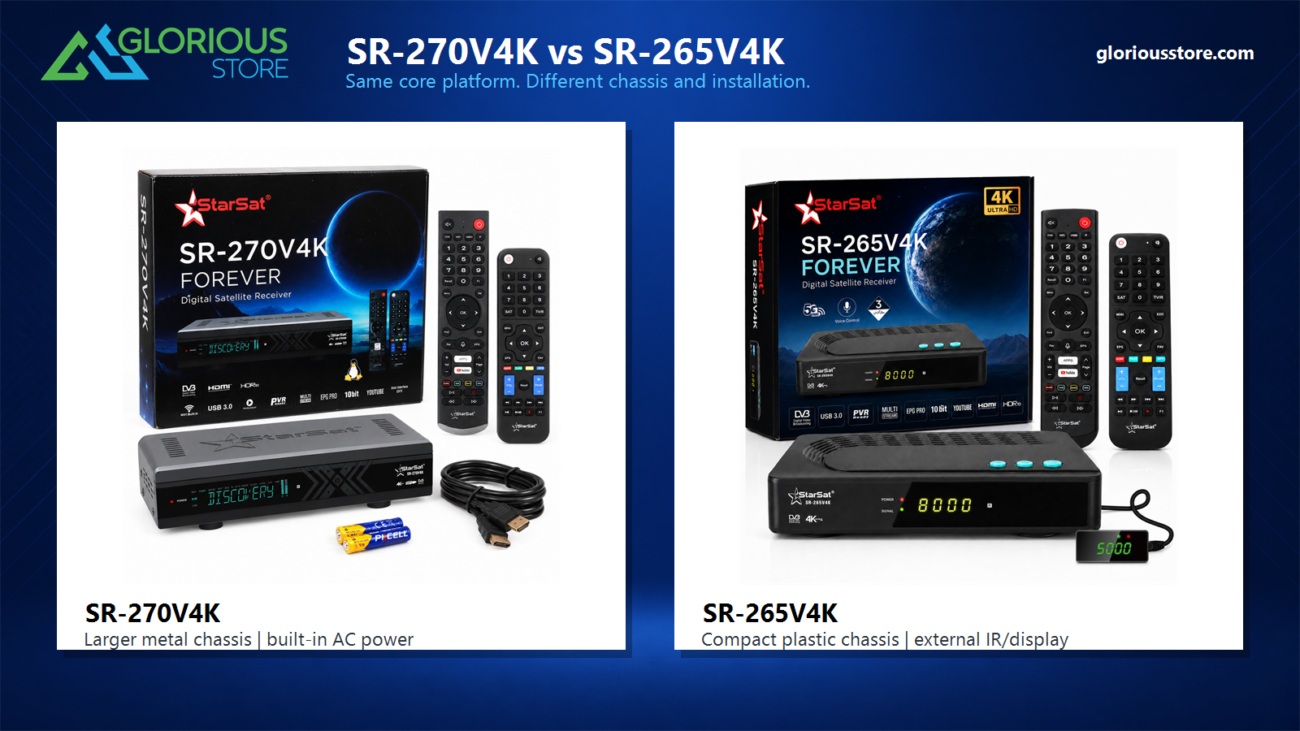
The SR-270V4K vs SR-265V4K comparison is not a contest between a high-spec receiver and a low-spec receiver. These two StarSat models share the same core 4K Linux receiver platform and the same everyday feature class. The practical choice is physical: the SR-270V4K is the larger model with a metal body and full-size front panel, while the SR-265V4K is the smaller plastic model with an external IR/display accessory for more flexible placement.
That distinction matters because catalogue checklists can make related receivers look more different than they are. One product page may spell out a chipset, memory or HDMI line while another focuses on installation and package contents. For this guide, Glorious Store checked the current product listings, official gallery images, SR-270V4K specification sheet and the exact accessories shown with each retail package. The result below separates their shared platform from the differences a buyer can actually see and use.
The timing is relevant for UAE and wider Middle East buyers. IBC2026 is highlighting hybrid media delivery, where satellite, internet and connected devices work together rather than as isolated systems. An official IBC session scheduled for September 12, 2026 discusses satellite within connected broadcast and IP networks. At home, the useful lesson is simple: evaluate the tuner, network, television connection, storage and physical installation as one system.
On August 31, 2026, Glorious Store showed the StarSat SR-270V4K with 18 units in stock and the StarSat SR-265V4K with 14 units. Stock changes, so recheck the live pages before ordering.
Quick answer: what is actually different?
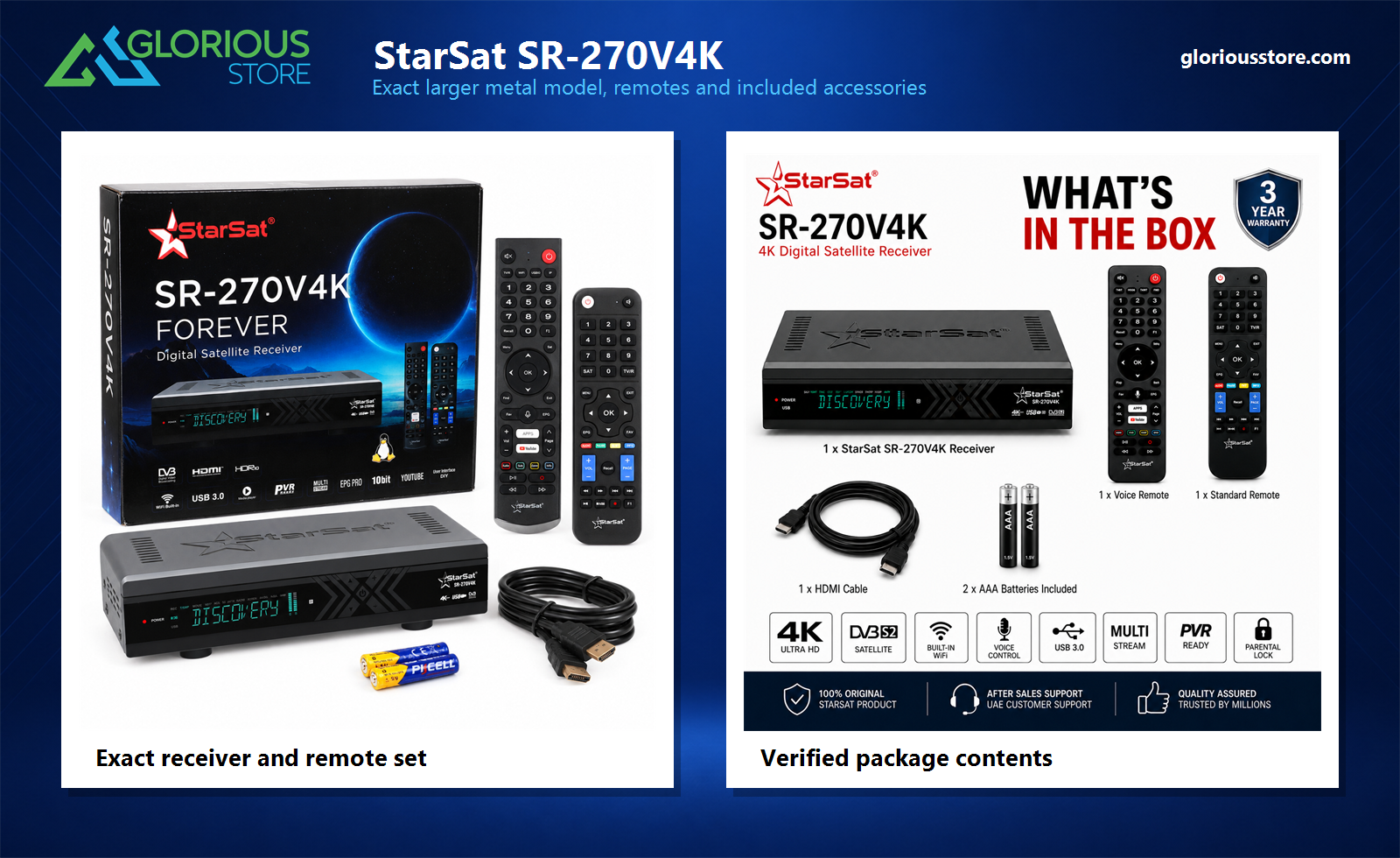
Choose the SR-270V4K when you prefer a larger receiver with a metal chassis, an integrated front display and controls, and a direct AC power arrangement. Its wider case looks and installs like a traditional full-size satellite receiver. The published package shows the exact SR-270V4K, two matching remotes, HDMI cable and AAA batteries.
Choose the SR-265V4K when cabinet space is limited or you want the included external IR/display module. Its smaller plastic chassis uses an external 12V power adapter and has an IR-EX connection. The extender lets the receiver respond to the remote and show status information even when the main unit is positioned behind a television or deeper inside compatible furniture, provided ventilation is maintained.
Do not choose between them on assumed picture quality, Linux capability or headline performance. Their core buyer-facing specification is the same class. Choose by body construction, size, power layout, front-panel arrangement and installation accessories.
Shared SR-270V4K and SR-265V4K specifications
Both current listings and their official product artwork place these models in the same core feature family:
- Linux-based digital satellite receiver
- DVB-S and DVB-S2 satellite reception
- 4K Ultra HD output for compatible televisions and content
- Multi-Stream support
- 10-bit video processing and HDR10 presentation in the product materials
- Built-in Wi-Fi, including 2.4GHz and 5GHz connectivity in the listings
- RJ45 Ethernet for a wired network connection
- HDMI output, USB 3.0, AV output and S/PDIF digital audio
- USB media playback, PVR-ready recording and timeshift support
- EPG and supported channel-management functions
- Voice-control support with two included remote controls
- HDMI cable and AAA batteries shown in the retail package
The SR-270V4K specification PDF additionally names the Montage MS2653 chipset, ARM Cortex-A53 CPU, 1GB SDRAM, 256MB flash, M88TS6011 tuner and HDMI 2.1/HDCP 2.2 output up to 4K at 60fps. Those detailed silicon lines are not repeated in the SR-265V4K web description, but they should not be presented as a performance advantage between these two models. The verified catalogue position is that they share the same core specification; exact component revisions can still vary by production batch, so buyers with a component-level requirement should confirm the current retail unit.
The differences that should drive the purchase
| Decision point | StarSat SR-270V4K | StarSat SR-265V4K |
|---|---|---|
| Core feature class | Same 4K Linux/DVB-S2/Multi-Stream family | Same 4K Linux/DVB-S2/Multi-Stream family |
| Body | Larger metal chassis | Smaller plastic chassis |
| Physical style | Traditional full-size receiver | Compact receiver for tighter spaces |
| Front arrangement | Large integrated front display and front controls | Compact front panel; external IR/display module is included |
| Power | Direct AC input with rear power switch | External 12V, 1.5A adapter |
| External IR/display | Not shown in the verified package contents | Included and connected through IR-EX |
| Remotes | Voice remote plus standard remote | Voice/air-mouse remote plus standard IR remote |
| Best reason to choose | Metal build and full-size receiver layout | Compact placement and IR/display extender |
This table is intentionally about purchase decisions rather than repeating every shared logo on the boxes. The model number alone does not make the SR-270V4K faster, and the smaller case does not make the SR-265V4K less capable for normal supported use.
Why the SR-270V4K suits a traditional equipment setup
The SR-270V4K is physically the more substantial receiver. Its metal body, wide front display, ventilation openings and integrated controls suit an open media shelf or an equipment stack where the receiver remains visible. The rear panel shown in the listing provides LNB input, AV, HDMI, USB 3.0, LAN and S/PDIF, plus a rear on/off switch and direct mains connection.
Its package photography is also specific. It shows the exact SR-270V4K chassis, the correct voice remote, the correct standard remote, an HDMI cable and two AAA batteries. That matters because generic receiver illustrations can hide differences in button layout or case proportions. The image above is built from the product listing photographs, not a recreated receiver or approximate remote.
The SR-270V4K is the better physical choice when metal construction and a conventional full-size component are priorities. It still needs free airflow around the vents. A metal case does not make it safe to seal inside a cabinet or stack under equipment that produces significant heat.
Why the SR-265V4K suits compact or hidden placement
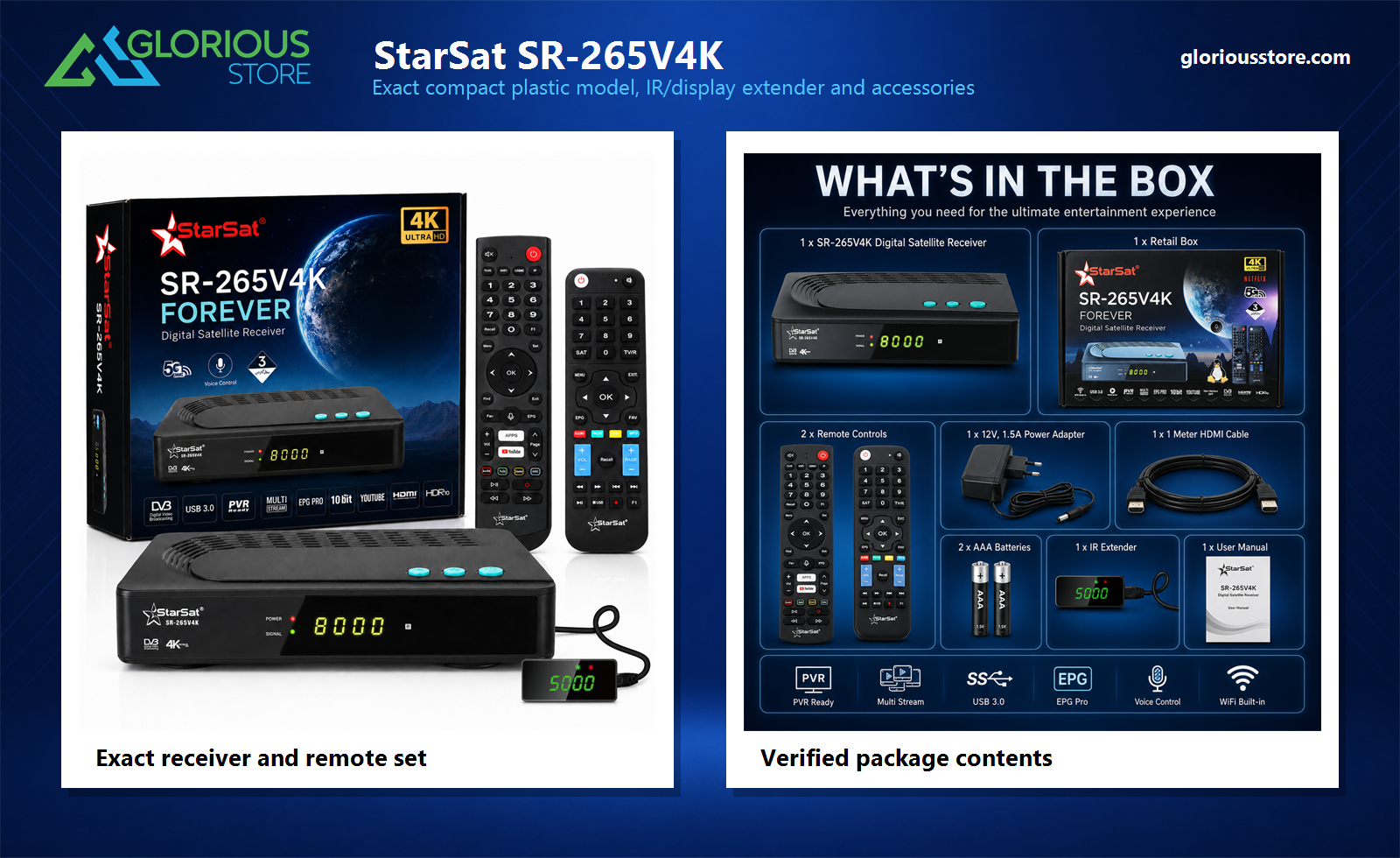
The SR-265V4K uses a smaller plastic enclosure and an external 12V, 1.5A power adapter. Its rear connectivity includes LNB input, AV, HDMI, USB 3.0, LAN, S/PDIF, IR-EX and DC 12V. The IR-EX port is the defining installation difference because the included module combines an infrared receiver with a small external display.
That module can be positioned where the remote can reach it while the main receiver sits farther back. It is useful for a wall-mounted television, a narrow shelf or compatible cabinet layout. The main unit still requires ventilation, and the extender cable should be routed without strain or sharp bends.
The current package image shows the exact receiver, retail box, two exact remotes, external power adapter, HDMI cable, two AAA batteries, IR extender/display and user manual. It should therefore be the starting point when checking what is included rather than an illustration of generic accessories.
What Linux, 4K and Multi-Stream do not guarantee
Linux provides the receiver platform, but the word alone does not promise Android TV certification, the Google Play Store, every streaming service, unrestricted third-party software or permanent access to any app. Supported functions depend on the model firmware, licensing, region, internet connection and future updates.
Likewise, 4K capability means the receiver can output supported UHD material to a compatible television. It cannot turn every HD channel into native 4K, guarantee a specific sports feed or unlock encrypted content. The source, satellite footprint, dish alignment, tuner settings, authorization, HDMI connection and television all affect the result.
Multi-Stream reception is supported in the current materials for both models, but it is not a substitute for channel authorization. Glorious Store’s Multi-Stream satellite receiver guide explains the reception concept in more detail. Ask an installer which satellites, transponders and services are relevant to your location before treating any feature logo as a guaranteed channel list.
UAE pre-purchase checklist
- Confirm the physical location. Measure shelf width, depth and cable clearance. Choose the SR-270V4K for a full-size metal component or the SR-265V4K for a compact layout with an extender.
- Check ventilation. Keep the top and side vents clear, especially in UAE rooms where enclosed furniture can trap heat.
- Verify the satellite system. Dish size, alignment, LNB, coax, connectors, DiSEqC configuration and satellite footprint matter as much as the receiver.
- Confirm required channels and services. Encryption, subscriptions and broadcaster device rules can require authorized hardware or software.
- Plan the network connection. Use Ethernet when practical; Wi-Fi performance varies with walls, interference, router distance and band selection.
- Check the television and audio path. Confirm HDMI input, supported resolution, cable condition and whether audio goes through the TV, soundbar or AV receiver.
- Test USB storage. PVR and timeshift depend on compatible storage, available capacity, formatting, firmware and channel restrictions.
- Use the exact included remote set. Button layouts differ between models, so replacement or accessibility decisions should use the real product photos.
Browse the current 4K satellite receiver collection or contact Glorious Store with your television, dish, cabinet and service requirements before ordering.
Frequently asked questions
Do the SR-270V4K and SR-265V4K have the same specifications?
They share the same core buyer-facing 4K Linux receiver specification and feature family. The important differences are the metal versus plastic body, overall size, power arrangement, front-panel design and the SR-265V4K external IR/display accessory.
Is the SR-270V4K automatically faster because its model number is higher?
No. The SR-270V4K page publishes more component detail, but that should not be used to claim a performance advantage over the SR-265V4K. Choose by the verified physical and installation differences.
Which model is better for a hidden cabinet?
The SR-265V4K is the more flexible option because its package includes an external IR/display extender. Keep the receiver ventilated even when it is out of sight.
Which model has the stronger body?
The SR-270V4K uses the larger metal chassis. The SR-265V4K uses a smaller plastic chassis designed around a more compact installation.
Do both packages include two remotes?
Yes. The current listing images show a voice-capable remote and a standard remote with each model. The shapes and button layouts are model-specific, so use the exact gallery images when identifying replacements.
Final recommendation
Buy the SR-270V4K for its larger metal body, traditional front display and full-size equipment style. Buy the SR-265V4K for its smaller plastic body, external 12V adapter and included IR/display extender. For picture, Linux functions, satellite reception, networking, USB recording and voice control, treat them as the same core specification class and make the decision from the installation outward.



Leave a comment